Prismatic Software Editorial Team
TL;DR: Moving a desktop photo or batch-processing app to the web gets you cross-platform reach and subscription revenue, but you lose offline-first workflows, raw file-system access, and the batch throughput a single machine's CPU and disk give you by default. The migration works when heavy processing moves to a server-side job queue instead of a browser UI loop, and when power-user shortcuts — keyboard batch actions, presets, bulk exports — are rebuilt deliberately rather than assumed to carry over.
Desktop photo and batch-processing tools earn loyalty the hard way: a studio builds its entire intake-to-export workflow around keyboard shortcuts, watched folders, and a processing engine that runs flat-out on local hardware all night if it has to. That's exactly the audience a web migration puts at risk, because none of those three things exist by default in a browser.
Plenty of desktop software vendors are weighing this move right now — subscription pricing, cross-platform reach, and easier updates are real pulls. Teams making the jump without an in-house web team often bring in a SaaS product engineering team at YuSMP Group to design the server-side architecture before committing to a public beta, specifically because the mistakes below are expensive to unwind after launch.
Why Photo/Batch-Processing Software Teams Consider the Move to Web
Three pressures tend to show up together. First, the licensing model: a one-time desktop license caps revenue per customer, while a subscription model tied to a web app turns the same customer into recurring revenue. Second, offline batch jobs that only ran because a user manually kicked them off at their desk become something a server can run on a schedule, across a team, without anyone babysitting a machine. Third, cross-platform reach — a browser-based tool works the same on a Mac, a Chromebook, or a tablet, which a Windows-only or macOS-only desktop app never will.
None of those pressures are wrong. The problem is that each one trades away something the desktop version did for free, and that trade is invisible until a power user hits it.
What You Lose When You Leave the Desktop
File-system access and local batch throughput for large RAW sets
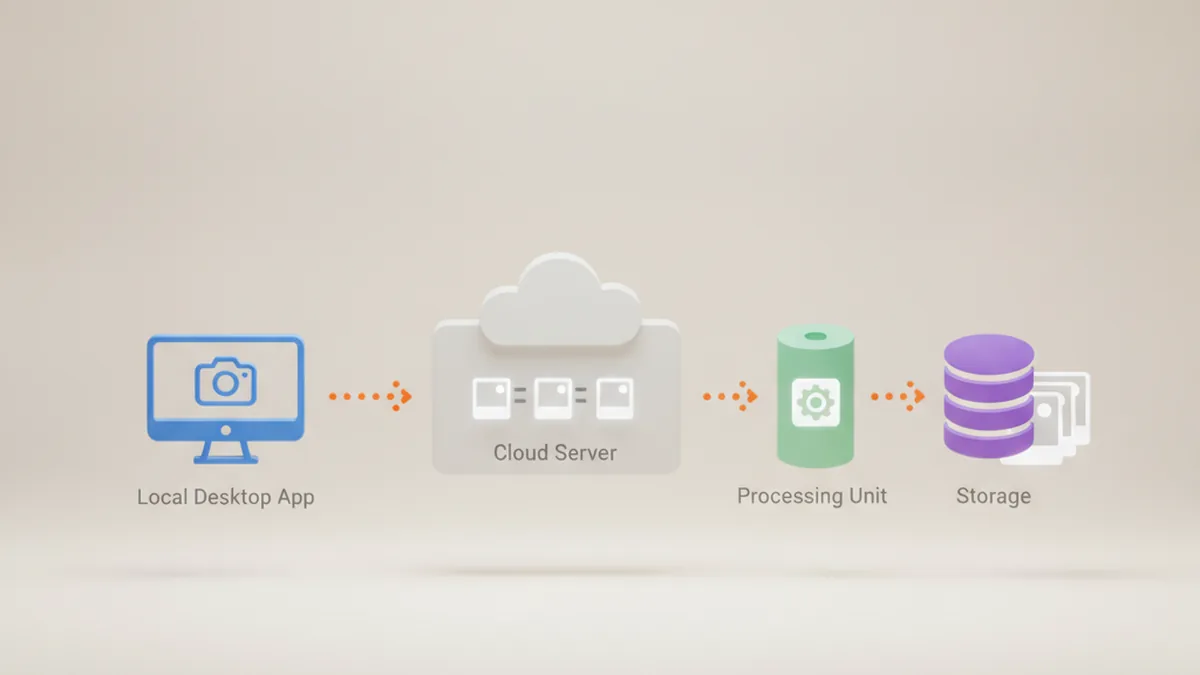
A desktop batch tool reads directly off a local or networked drive and writes back to it, at whatever speed the disk and CPU allow. A web app has no native file-system access at all — every file has to be uploaded, processed somewhere, and downloaded back, which turns a near-instant local batch job into one gated by upload bandwidth and server queue depth.
Offline-first workflows (studios without reliable connectivity)
Desktop software doesn't care if the internet is down. A studio culling and processing a shoot on location, or a photographer working from a hotel with bad Wi-Fi, loses that entirely with a pure web app unless offline support is built in deliberately — and most web migrations don't budget for it until users complain.
Native OS integration (drag-and-drop, Finder/Explorer extensions)
Right-click context menu actions, Finder or Explorer shell extensions, and drag-and-drop straight from a camera's mounted volume are desktop-only conveniences. They're small individually, but for a power user who built a workflow around them, their absence is the first thing noticed and the hardest to explain away.
Architecture Choices That Determine Whether the Migration Works
Where heavy processing lives: browser (WASM) vs. server-side queue
WebAssembly can run real image-processing code in the browser, and it's a reasonable fit for single-image edits where latency matters more than throughput. It's a weaker fit for sustained batch work on large RAW files, where a single browser tab competes for one machine's resources the same way the old desktop app did — except now that machine might be underpowered compared to what a studio used to dedicate to the job. Most migrations end up moving batch processing server-side, into a job queue that can scale independently of whatever device submitted the job.
Handling large files (chunked upload, background jobs, progress UX)
RAW files routinely run 30–100+ MB each, and a batch can mean hundreds of them. Naive single-request uploads fail silently on flaky connections and give users no sense of progress. A migration that keeps power users needs chunked, resumable uploads, background job processing that survives a closed browser tab, and progress UX that reports per-file status — not a single spinner for the whole batch.
Keeping batch semantics in a request/response web model
The web's default interaction model is request, then response. Batch processing is the opposite: submit many jobs, then check back. Treating a batch like a single long-running HTTP request is a reliability trap — timeouts, lost connections, and no way to resume. The fix is architectural: a batch becomes a set of queued jobs with their own state, polled or pushed to the client, independent of any single request staying open.
| Aspect | Desktop app | Web/SaaS app |
|---|---|---|
| Offline support | Native, no extra work | Requires explicit engineering (service workers, local cache) |
| Large-batch RAW throughput | Limited to local CPU/disk | Can scale horizontally via server-side queue |
| Update/distribution model | Manual installers, versioned releases | Continuous deployment, instant for all users |
| Licensing | One-time purchase, per-machine | Subscription, per-account, easier upsell |
| Cross-platform access | Tied to OS the app was built for | Same experience on any device with a browser |
| Collaboration features | Requires separate file-sharing workflow | Shared state and permissions built in |
A Practical Migration Path
- Audit which desktop features are actually used by power users — don't guess. Usage logs or direct interviews beat assumptions; the feature your team thinks is core may be rarely touched, and the keyboard shortcut nobody mentioned may be load-bearing for your heaviest users.
- Decide server-side vs. client-side processing split. Make this call per operation, not once for the whole app — quick previews can stay client-side while full-resolution batch exports move server-side.
- Rebuild the batch pipeline as a job queue, not a UI loop. Treat every batch submission as a set of independent, resumable jobs with their own status, not a sequence of actions tied to one browser session staying open.
- Preserve power-user shortcuts (keyboard batch actions, presets) in the web UI. Rebuild them explicitly rather than hoping a generic web UI pattern is close enough — this is usually where retention is won or lost.
- Run desktop and web in parallel before sunsetting desktop. Real workloads from real power users surface gaps that a staging environment never will; teams building this kind of SaaS migration typically keep both versions live for at least one full release cycle before any sunset date is announced.
Desktop vs. Web: A Quick Comparison
The table above makes the trade-offs explicit, but the short version is this: web wins on distribution, collaboration, and licensing flexibility; desktop still wins on offline reliability and raw local throughput. A migration that pretends otherwise on either side loses either the business case or the power users.
How Not to Lose Your Power Users
Transparent communication matters more than any single feature decision — tell power users what's changing and why, early, not after they discover a missing shortcut on launch day. Preserve every export format the desktop app supported; a workflow that depended on a specific file naming convention or output structure breaks silently otherwise. Keep batch actions keyboard-first in the web UI rather than mouse-only, since that's often the exact habit power users built their speed around. And consider migration incentives — a grandfathered license rate or an extended discount for existing desktop customers moving to the subscription model softens a transition that otherwise reads as a price increase with extra steps.
Frequently Asked Questions
Does moving to the web mean I lose batch processing speed?
Not necessarily, but you lose it by default if you simply port a desktop UI loop to a browser request/response cycle. Keeping batch speed means rebuilding batch jobs as a server-side queue rather than a sequence of UI actions.
Can a web app still process RAW files as fast as desktop software?
Server-side processing can match or beat desktop throughput for large batches because it isn't limited by one machine's CPU. Browser-only processing via WebAssembly is improving but still trails native code on heavy RAW decode and demosaic work.
Should I keep a desktop version running in parallel?
Yes, at least through a transition period. Running both versions lets power users validate the web app against real workloads before the desktop app is sunset, and surfaces gaps you won't find in a test environment.
What's the biggest risk in a desktop-to-web migration for photo software?
Assuming feature parity is enough. Power users adopt software for specific workflows — keyboard-driven batch actions, offline access, file-system shortcuts — and a web app that matches the feature list but not the workflow will lose them anyway.
Do web-based photo tools support offline mode at all?
Some do, through service workers and local caching, but offline support in a web app is an explicit engineering investment, not something you get by default the way a desktop app does.
How long does a typical desktop-to-web migration take for a small team?
It depends heavily on how much of the desktop app's logic can move server-side versus how much has to be rebuilt for the browser, but a small team should budget months, not weeks, once batch processing and large-file handling are in scope.
Is WebAssembly enough to replace native desktop performance?
For many single-image operations, yes. For sustained batch throughput on large RAW files, WebAssembly in a single browser tab is still generally slower than native multi-threaded desktop code, which is why most migrations move heavy batch work server-side instead.
For background on running real processing code inside the browser itself, MDN's WebAssembly documentation covers what WASM can and can't do relative to native code — useful context when deciding how much of a batch pipeline belongs client-side.